Ghostface AI CapCut template for TikTok
A CapCut template turns your Ghostface AI photos into a quick, beat-synced TikTok. The template does the editing, but it does not make the AI photos, so you need those first.
What a Ghostface CapCut template is
CapCut is a free video editor from ByteDance, the company behind TikTok. Its templates are ready-made edits that other users publish: the cuts, zooms, flashes, text and music are already set, and you only swap in your own photos or clips.
For this trend there is no single official template. CapCut's Ghost Face Killer Scream template page lists many user-made Ghostface and Scream edits, and new ones appear every week in spooky season. They all have one thing in common: they expect you to bring the pictures.
Step 1: make your Ghostface AI photos
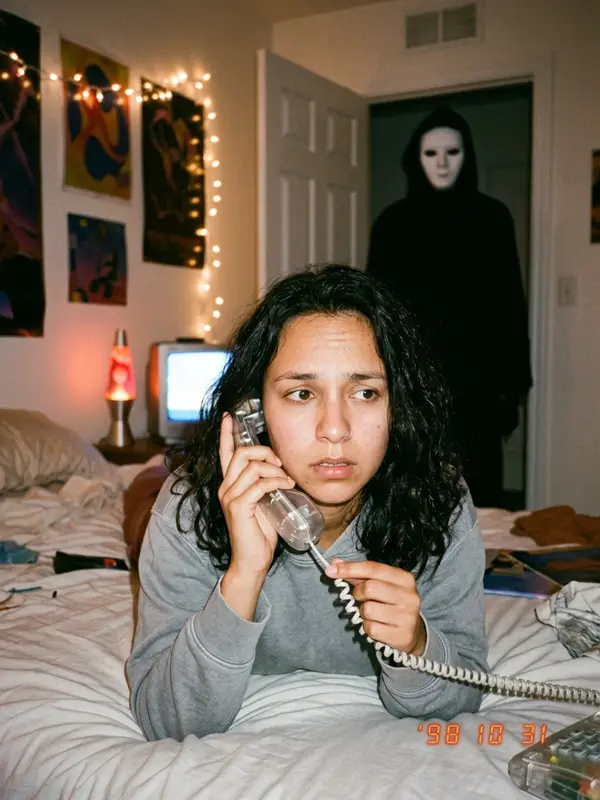
The photo is the part people actually react to: you in a grainy 90s bedroom, on the phone, with a masked figure in a black hooded robe standing in the doorway. You have two ways to make it:
- Free: copy a prompt from our free Ghostface AI prompts into Gemini with a clear selfie. One scene per prompt, with a few retries.
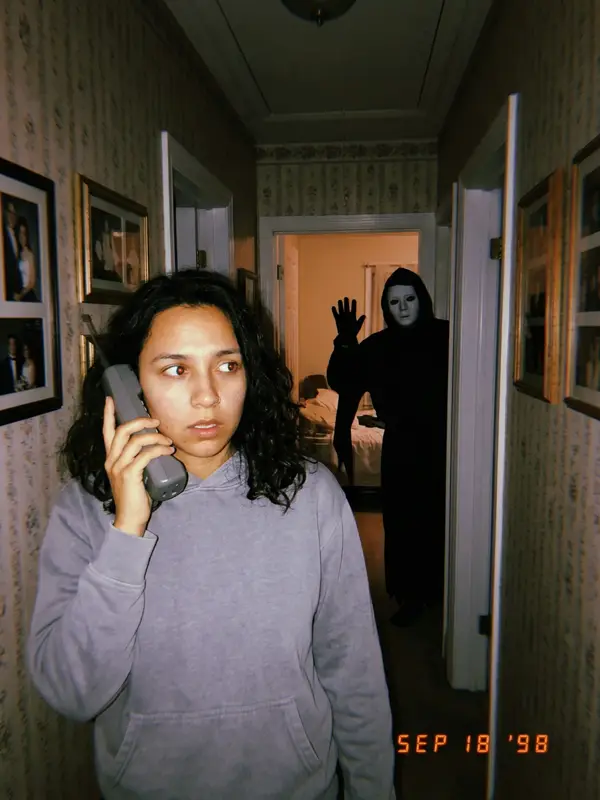
- Fast: upload one selfie to our generator and get all 4 scenes (phone call, mirror, couch, hallway) in about two minutes.
Templates usually have 3 to 6 photo slots, so 4 scenes fill most of them without repeating a shot.
Step 2: pick and fill a template
- Open CapCut, go to Templates and search "ghostface".
- Or, on TikTok, open a Ghostface video you like. If it was made from a template, there is often a CapCut link above the caption that opens the same edit.
- Check the number of slots and the length. 8 to 15 seconds suits this trend.
- Tap Use template and choose your photos. Put the calmest photo first and the hallway shot last, so the figure gets closer as the clip goes on.
- Preview, then export. Some templates and effects need CapCut Pro, and the app tells you before you export.
Step 3: sound, caption and posting
The trend's signature sound is a remix of "Deceptacon" by Le Tigre. If your template uses a different song, post to TikTok and swap the sound there. Keep the caption short: "pov: you answered the phone in 1998" leaves the joke to the picture.
Want movement rather than a slideshow? Our Ghostface AI video page shows the 8-second clip where you turn around and the figure waves. You can post it on its own or put it at the end of your template edit.
Template, AI video or both?
| CapCut template | AI video | |
|---|---|---|
| Starts from | Your finished photos | One finished photo |
| What moves | Cuts, zooms and flashes between photos | The scene itself: you, the figure, the light |
| Best for | A 4-photo reveal | A single creepy moment |
| Cost | Often free, some need Pro | Included in our $14.99 pack |
New to the trend? Read what the Ghostface AI trend is first, then come back to edit.
Get 4 template-ready scenes from one selfie
Make my Ghostface photosCapCut and TikTok are trademarks of their owners. This site is not connected to them or to the Scream films.
FAQ
Is there a CapCut template for the Ghostface AI trend?
Yes, several. CapCut lists user-made Ghostface and Scream edit templates on its Ghost Face Killer Scream template page. They are video edits: you add your own photos or clips, and the template adds the cuts, effects and music.
Does a CapCut template make the AI photo for me?
No. A template edits photos you already have. Make the Ghostface AI photos first, with Gemini and a free prompt or with our generator, then drop them into the template.
How do I find the template from a TikTok video?
Videos made from a CapCut template often show a CapCut link above the caption. Tap it to open the same template in CapCut. You can also search "ghostface" in CapCut's Templates tab.
What sound should I use?
Most Ghostface AI posts use a remix of "Deceptacon" by Le Tigre. If the template has a different song, you can change it in TikTok when you post.
Are CapCut templates free?
Many are free to use, but some effects and templates need a CapCut Pro plan, and that can change. The template page shows what you need before you export.
Ask an AI about this page