The Ghostface AI video version
The video version takes the classic Ghostface AI trend photo and makes it move: the phone line hisses, you slowly turn, and the masked figure behind you tilts its head and waves.
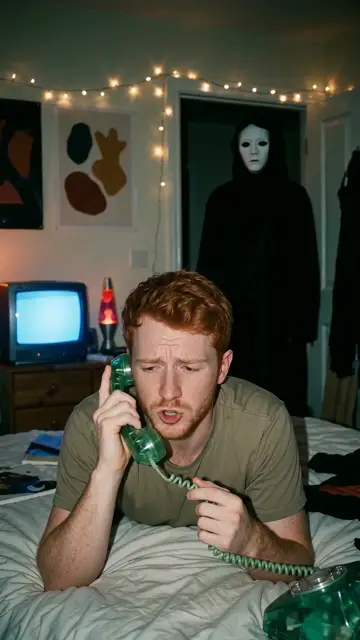
What you get
- About 8 seconds, vertical 9:16, 720p, ready for TikTok, Reels and Shorts.
- Your face from your selfie, kept in every frame.
- Eerie sound: a low drone, phone line hiss and a sting at the end. No dialogue.
- No weapons, no gore. Spooky, not violent.
How it is made
First we make your bedroom phone call photo in vertical format, then an AI video model animates it from that first frame. It is included in the photos + video pack and takes about 3 to 5 minutes after your photos.
Do it yourself
Have your own Ghostface photo and access to an image-to-video tool? Use your photo as the first frame and this prompt:
Posting tips
- Add the "Deceptacon" remix from the sound library, the trend's signature sound.
- Post the video first, then a carousel of your 4 photos.
- Caption idea: "pov: you answered the phone in 1998".
Get your photos and the video together
Make my Ghostface videoFAQ
How long is the Ghostface AI video?
About 8 seconds, vertical 9:16 at 720p, with eerie sound and no dialogue.
How do I add the Deceptacon sound?
Download your video, upload it in TikTok or Instagram, tap Add sound and search "Deceptacon". Lower the original sound if you want only the song.
How long does the video take?
About 3 to 5 minutes after your photos are ready.